Visitors & Follow-Up
How to Automate Church Follow-Up While Keeping It Personal
By Church By Faith Team · · 5 min read
Automation can make sure no guest is forgotten, but it can't love anyone. Here is how to decide what to automate and what must stay in human hands.
Every church leader has felt the pull of automation: set it up once, and every visitor gets a welcome, every new member gets a note, and nobody falls through the cracks. It's a good instinct. But a church isn't a store, and a guest who gets five polished emails and never hears a human voice can feel more processed than welcomed.
The goal isn't to automate follow-up. It's to automate the remembering, so your people have more time for the caring.
What automation is good at, and what it isn't
Automation is excellent at a few specific things:
- Consistency. It sends the welcome email every single week, including the week the pastor has the flu.
- Timing. It can wait three days, then send the next step, without anyone setting a reminder.
- Sorting. It can tag people so your team can find all of last month's guests in one list.
- Not forgetting. It never loses a card in a coat pocket.
It's poor at everything that requires discernment:
- Noticing that a guest's short reply means they're grieving.
- Knowing that a family needs a meal, not a newsletter.
- Deciding when to stop, or when to call instead of write.
- Praying with someone.
"Bear ye one another's burdens, and so fulfil the law of Christ" (Galatians 6:2, KJV). No software carries a burden. People do.
A simple rule: automate reminders, personalize relationships
When you're deciding whether something should be automated, ask one question: Would this message be the same for everyone?
- If yes, it's a good candidate for automation. A thank-you for visiting, service times, where to park, how to find the sermon online.
- If no, a person should send it. A reply to a prayer request, an invitation to a specific group, a check-in after a hard week.
There's a second, often overlooked use of automation: reminding your team, not just messaging your guests. A tag that puts a new guest on a "call this week" list, or an inbox view that shows follow-ups due, keeps the human part of the process moving. In a small church, automating the reminder to call can matter more than automating the email.
Picture a typical Monday. A guest registered on Sunday. An automated thank-you goes out that evening, and the same automation tags her as a new guest. On Tuesday, the welcome lead opens the list of new guests, sees her name, and asks the greeter who met her to call. The email was automatic. The call was not. That balance is the whole idea.
What to automate and what to keep personal
Good to automate:
- A short welcome email the day after someone registers as a guest.
- A second email a few days later with practical information, like service times or how to watch online.
- Tagging new guests so they appear in a list your team reviews weekly.
- A welcome email when someone becomes a member, with how to join a group or update their profile.
Keep personal:
- Any response to a prayer request or pastoral need.
- The first phone call or personal message.
- Invitations to a specific small group or ministry.
- Any message to someone who hasn't been back for a while.
- Anything involving grief, illness, conflict or a crisis.
How to make automated messages still feel human
When you do automate, a few habits keep it warm:
- Sign with a real person's name, and make sure replies go to someone who will read them.
- Write like you talk. Plain, short sentences. No marketing language.
- Send fewer messages than you think. Two or three automated emails is usually enough. Your people should do the rest.
- Write each language properly. In a bilingual church, give Spanish-speaking guests a Spanish email written for them, not a machine translation.
- Respect consent. Only email people who agreed to email. Only text people who agreed to texts.
- Know where the off switch is. If something goes wrong, or a sensitive situation comes up, you should be able to pause every automation at once.
- Review it every few months. Read your automated emails out loud. If they no longer sound like your church, rewrite them.
A word on AI writing tools: they can help draft a reply, but a person should always read, adjust and decide to send it. A draft is a starting point, not a pastoral response.
How Church By Faith approaches automation
Church By Faith keeps automation deliberately simple, and it's worth being clear about its limits.
What it automates:
- Three triggers: someone downloads a book, a member joins, or a guest registers.
- Four actions: send an email, add a tag, remove a tag, or send a push notification. Push delivery isn't something to rely on today, so plan around email.
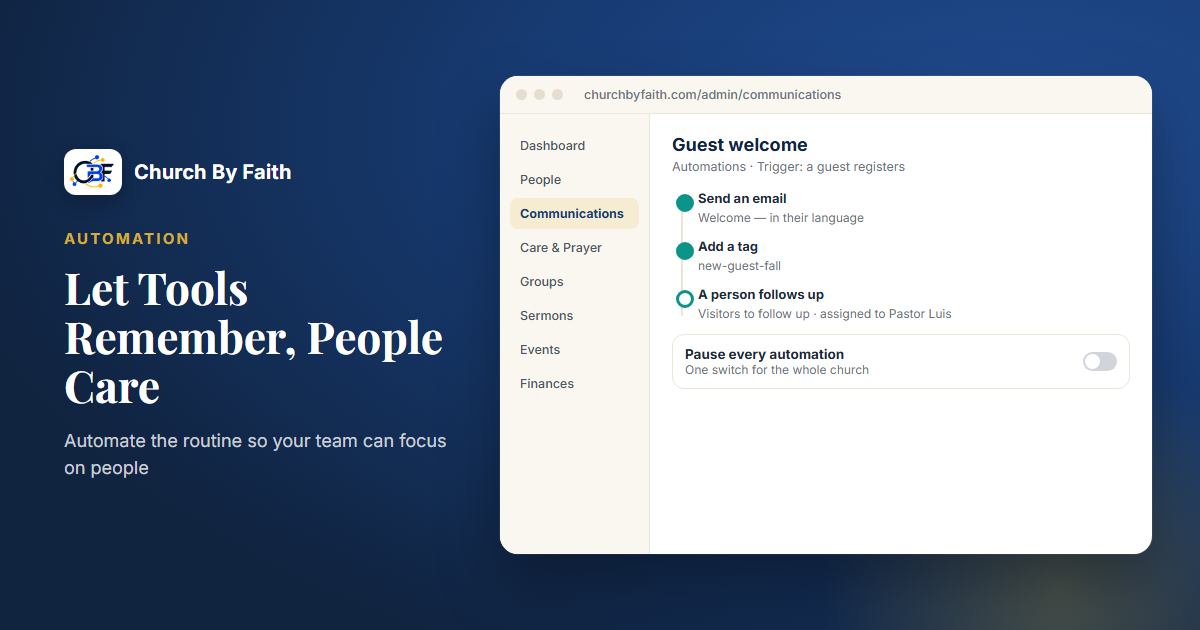
- Two starter sequences, "Member welcome" and "Guest welcome," with a set number of days between steps. Both ship as drafts, so nothing goes out until your church turns them on. You can edit the wording in English and Spanish under Message templates.
- Built-in guardrails: emails are skipped for people with no email consent on file, who unsubscribed, or whose address bounces, and a delivery log shows what ran. A "Pause every automation" switch stops everything at once.
- Tags and segments, so you can build a list such as guests who joined in the last 30 days.
What stays with your team, with tools to help:
- The shared Inbox, where conversations can be assigned to a specific person, snoozed, and tracked in views like "Assigned to me" and "Follow-ups due." Internal notes are never sent to the guest.
- Approved reply templates as a starting point for personal replies.
- An optional "Suggest a draft" AI helper that your church can turn on. AI text is never sent automatically.
- One-to-one texting from the Inbox, once your church connects its own number and completes carrier (A2P 10DLC) registration.
What it doesn't do: there are no SMS steps in automations, no custom triggers, and no visual workflow builder. If you want a text in your welcome process, have the automation add a tag, and let a person send a personal text from the Inbox. That's often the better choice anyway.
You can see these tools alongside the rest of the platform on the features page, and check which plan includes email campaigns and segments on the pricing page.
Key takeaways
- Automate the remembering, not the caring.
- If a message would be the same for everyone, automate it. If not, a person sends it.
- Use automation to remind your team, not only to message guests.
- Keep automated sequences short, signed by a real person, and in the guest's language.
- Respect consent and keep a pause switch within reach.
- Let AI draft if you like, but a person always decides what gets sent.
See what Church By Faith automates, and what it leaves to your team: explore the features.