Church Management
How to Run a Bilingual Church Website and Member Experience
By Church By Faith Team · · 6 min read
A practical guide to serving a bilingual congregation online: let each person choose their language, translate for meaning, and publish announcements in both languages at once.
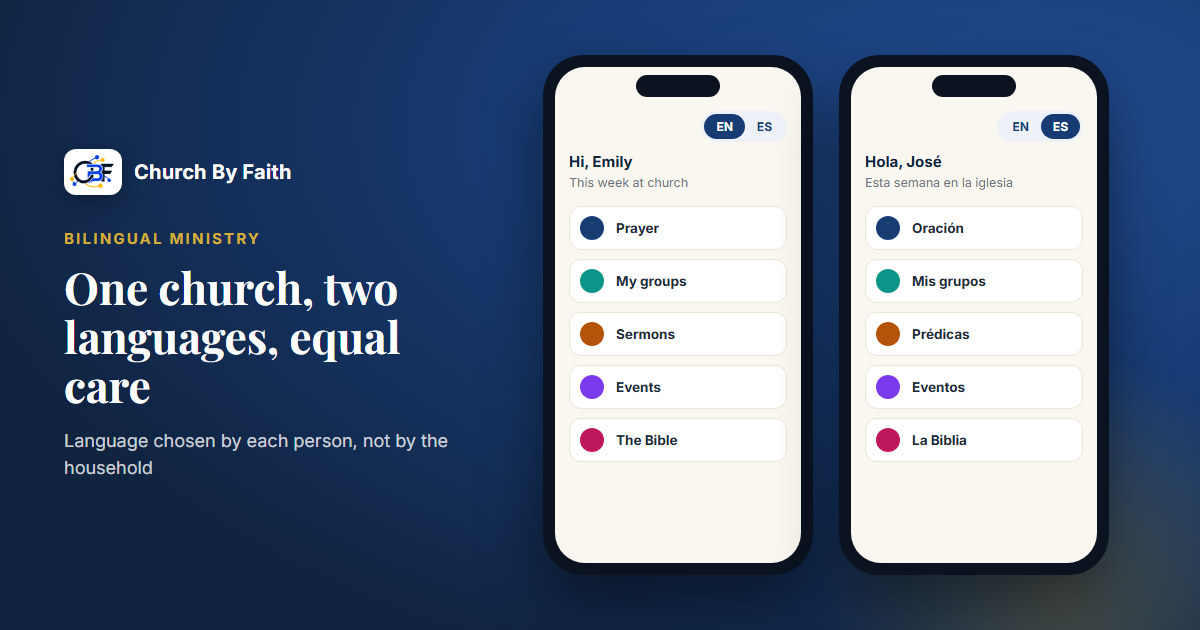
Many churches in the US worship in two languages, but their websites, apps and announcements still speak mostly one. The result is a quiet message to half the congregation: this was built for someone else. Here is how to give English and Spanish speakers an experience that feels equally theirs, from the first website visit to the Sunday announcement.
Start with who you are actually serving
Before you translate anything, picture the real people in your pews. In a bilingual church, language rarely follows neat lines:
- A grandmother reads everything in Spanish, while her grandson prefers English but understands both.
- A husband and wife each have a different "heart language" for prayer.
- A new visitor from Central America reads Spanish comfortably but has never seen church words like "small group" translated.
- Second-generation young adults may speak Spanish at home but read English faster.
This is why the most important decision is simple: language belongs to the person, not the household and not the church. If your tools pick one language per family, or ask people to switch every time they visit, someone is always reading in their second language.
Let each person choose, and remember the choice
A good bilingual member experience has a few basic traits:
- The choice is personal. Each member sets their own language once and it sticks, on the phone and on the computer.
- Everything follows the choice. Menus, buttons, emails and notices should all appear in that language, not just the home page.
- Nobody is second-class. Spanish speakers should not find missing screens, English-only error messages or a "coming soon" note where the Spanish should be.
- Staff can see it. When a pastor replies to a prayer request, they should know which language the person prefers before they type a word.
If you are evaluating software, test this yourself. Create a Spanish-speaking test member and walk through signing in, giving, submitting a prayer request and reading an announcement. Every English word that appears is a small crack in the welcome.
Translation habits that hold up
Tools make bilingual ministry possible, but people make it good. A few habits keep your translations trustworthy.
Translate for meaning, not word for word
"Plug in to a small group" does not survive a literal translation. Ask what the sentence is really inviting people to do, then say that naturally: "Únase a un grupo pequeño" or "Participe en un grupo en casa," depending on what your church calls them.
Keep a shared glossary
Write down how your church says its key terms in both languages and keep it where every volunteer can find it:
- Ministry names (Do you translate "Kids Church," or keep the English name?)
- Worship service names and times
- Giving terms (offering, tithe, ofrenda, diezmo)
- Formal or informal address. Decide whether your written Spanish uses "usted" or "tú," and apply it consistently.
Have a native speaker review
Automated translation is a helpful first draft, but a fluent person from your congregation should read everything before it goes out. They will catch the tone problems a machine misses, and they will know how your people actually talk.
Choose Scripture translations on purpose
When you quote a verse, use a recognized Spanish Bible translation rather than translating the English verse yourself. Your Spanish-speaking members will know the difference.
A workflow for bilingual announcements
Announcements are where bilingual churches most often slip. One language goes out on Tuesday, the other on Thursday, or the Spanish version quietly drops a detail. A simple, repeatable workflow fixes most of it:
- Draft in the writer's stronger language. Write it well first. Clear writing in one language produces clearer translation.
- Lock the facts. Before translating, confirm the date, time, address, contact person and any link. Put these in a short list at the top of the draft.
- Translate for meaning. Use your glossary.
- Review. A second person reads the translation and checks it against the facts list: same date, same time, same room.
- Publish both at the same time. Neither language should get the news first.
- Route replies to someone who speaks the language. If a Spanish speaker answers the announcement, the reply should reach a leader who can respond in Spanish.
Here is a short example:
Men's breakfast, Saturday, March 14, 8:00 a.m., Fellowship Hall. All men are welcome. Bring a friend. Desayuno de hombres, sábado 14 de marzo, 8:00 a. m., Salón de Comunión. Todos los hombres son bienvenidos. Traiga a un amigo.
Notice that the Spanish version follows Spanish date and time conventions. It is not just the English with Spanish words.
Bilingual website basics
Your website is often the first place a family decides whether your church has room for them. Some practical guidelines:
- Give each language its own pages. Side-by-side English and Spanish on one page gets long and hard to read. Separate pages with a clear language switch work better.
- Put the language switch where people look. The top of every page, labeled "Español" and "English," not just a flag.
- Say which services are in which language. "9:00 a.m. in English, 11:00 a.m. in Spanish, Wednesday bilingual prayer." This is the single most useful line for a visitor.
- Make the "New here" page equal in both languages. Same photos, same details, same warmth.
- Name a Spanish-speaking contact. A real person to call or write removes a lot of hesitation.
- Keep both versions current. An outdated Spanish page is worse than a short one. Put "update both languages" on the same checklist as "update the website."
How Church By Faith handles this
Bilingual support is one of the areas Church By Faith was built around (the features page lists the rest). The whole platform, on the web and in the upcoming native app, is available in English and Spanish, and each person chooses their own language, on every plan. The Spanish is a full, consistent translation written for Spanish-speaking congregations, using "tú" throughout. A mother can use it in Spanish while her son uses it in English, in the same church.
The same choice carries into communication. Email campaigns (on the Growth plan and up) have separate English and Spanish versions with a fallback, so each contact gets the version in their language. On the public email preferences page, people can choose their language as well as their topics. Staff can filter contacts and the inbox by language. The Bible includes four English and four Spanish translations, so a Spanish-speaking member reads a real Spanish Bible, not a translated screen.
For your public website, the Church By Faith team builds the site for you as a one-time service, separate from the monthly subscription, and church sites can have English and Spanish pages. At the time of writing, the $999 website package covers one language, and a second language is an add-on from $750, with the translation supplied by your church. You can see current details on the pricing page. Today the platform works in the browser on any phone, and the native app is coming.
If your team uses the optional AI "Suggest a draft" tool in the inbox, it can help with a first translation, but it never sends anything by itself. A person always reviews and sends, which fits the habits above.
Quick checklist
- Language is set by each person, not by household.
- Every screen, email and notice follows that choice.
- You have a written glossary of church terms in both languages.
- A fluent reviewer reads translations before they go out.
- Announcements go out in both languages at the same time, with the facts checked.
- Replies reach someone who speaks the person's language.
- The website shows service languages clearly and keeps both versions current.
See how Church By Faith lets every person use the whole platform in English or Spanish on the features page.