Church Management
How to Manage Church Volunteers and Ministry Teams Online
By Church By Faith Team · · 6 min read
Volunteers are the heartbeat of a small church. Here is how to organize ministry teams online, what tools each job needs, and where the gaps usually are.
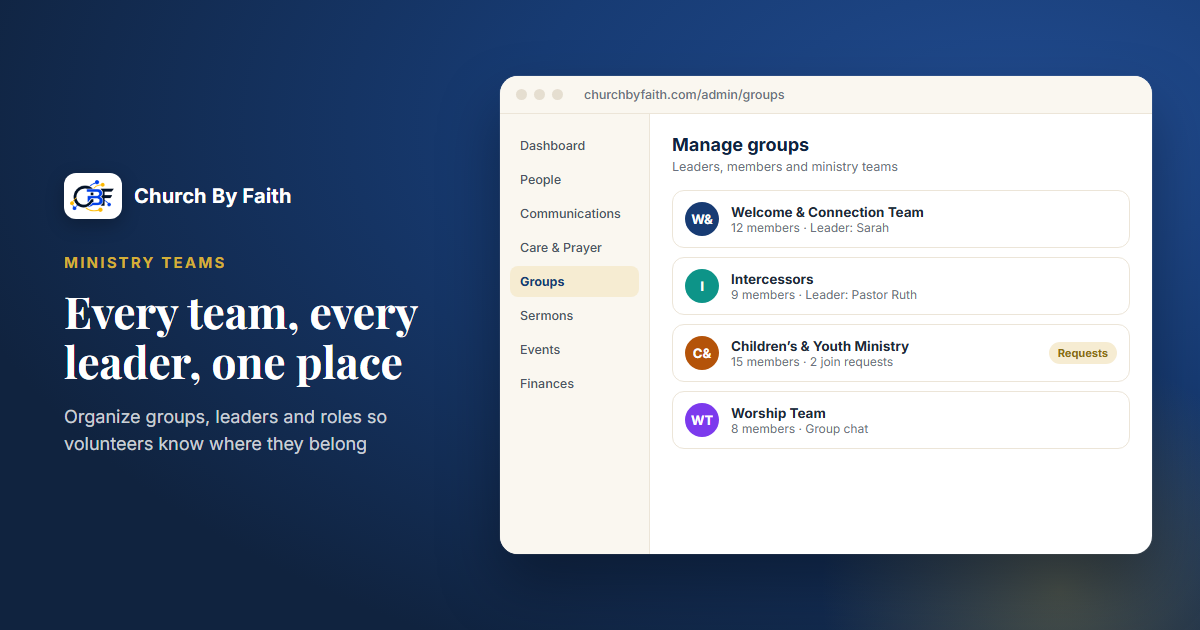
In most small churches, the same faithful people run the coffee, the sound board, the children's room and the prayer team. When everything lives in text threads and one leader's memory, people burn out and new volunteers never find a way in. Moving your ministry teams online does not need to be complicated, but it does help to know which part of the job each tool is actually good at.
Start with the structure, not the software
Before you open any app, write down how your ministry teams actually work. A single sheet of paper is enough.
For each team, answer four questions:
- What does this team do? One sentence. "Welcomes people at the door and helps first-time guests find their way."
- Who leads it? Name one point person, and ideally a second who can step in.
- Who serves on it today? List names, even if it is only three people.
- What does serving require? Time, training, and any screening, especially for anyone who works with children or vulnerable adults.
This exercise usually surfaces the real problems: a team with no clear leader, one person on four teams, or a ministry nobody has served in for months. Fix those on paper first. Software will organize a healthy structure, but it cannot create one.
Break "volunteer management" into separate jobs
"Volunteer management" sounds like one task, but it is really several different jobs. Naming them helps you choose tools honestly instead of hoping one app does everything.
- Belonging: who is on which team, and who leads it.
- Communication: how the team talks, shares updates and prays for one another.
- Permissions: what each leader can see and change in your church records.
- Scheduling: who serves on which Sunday, with swaps and reminders.
- Screening: background checks and training records for sensitive roles.
- Care: noticing who is tired, who has drifted, and who is ready for more.
Most church platforms are strong at the first three. Scheduling and screening are specialized jobs, and many churches handle them with a separate tool. That is fine, as long as you decide it on purpose.
Give every team a home and a leader
The most useful first step is giving each ministry team its own online space with a named leader. That space should let the leader:
- See who is on the team and add new people.
- Approve people who ask to join, rather than letting anyone in.
- Message the whole team in one place instead of five separate text threads.
- Share quick updates: "We need two extra greeters for the Easter service."
Keep team spaces focused. A worship team needs a different conversation than the hospitality team, so resist the urge to put every volunteer in one giant group.
Onboard new volunteers well
The first month decides whether a new volunteer stays. Pair each newcomer with an experienced team member for their first two or three times serving. Give them a one-page "how we do it" sheet: when to arrive, who to ask, what to do if something goes wrong. After their first Sunday, the team leader should send a short thank-you and ask one question: "What would have made today easier?" Small gestures like this tell people they are part of a family, not filling a slot.
Set permissions with care
Not every leader needs to see everything. A greeter team leader needs the team roster, not the giving records or private prayer requests. Give each person the least access their role requires, and review it whenever someone steps down. When a leader leaves, removing their access should be part of the handover, not an afterthought.
Capture skills and availability
Keep a simple record of what people can do and when they are generally free. "Plays keyboard, available most Sundays" or "Bilingual, can help at the welcome table." When a new need comes up, you can look for the right person instead of asking the same three people again.
Scheduling and screening: choose your approach
This is where churches most often need a plan beyond their main platform.
For scheduling, you have three sensible options:
- A shared calendar or spreadsheet with one row per Sunday and one column per role. Simple, free and good enough for many small churches. Assign one person to keep it up to date.
- A dedicated volunteer scheduling tool if you have many teams, frequent swaps, or need automatic reminders.
- Sign-up events for one-off needs, such as a church workday: publish an event with a set number of places and let people RSVP.
Whatever you choose, send the schedule out at a steady rhythm, such as the first week of each month, so volunteers can plan ahead.
For screening, anyone serving with children, youth or vulnerable adults should go through your church's safety policy. That usually means a background check through a screening provider, a reference or two, and basic training. Keep those records in a secure place with limited access, and set a date to renew them. Your insurance carrier or denomination may have specific requirements, so ask them first.
How Church By Faith handles this
Church By Faith is built around belonging, communication and permissions, so it covers the first half of the list above well. It does not include volunteer scheduling, serving rotas or background checks, and we would rather say that plainly than let you discover it later.
Here is what it offers for ministry teams:
- Groups for each team. Create a group for greeters, worship, children's ministry or any team you have. Each group can have leaders, a group picture, invitations, and a request-to-join approval queue, plus in-group messaging that leaders and admins can moderate.
- Roles and permissions. Seven built-in roles, including Group Leader, Care Team Member and Pastor, with permissions enforced at the database level. You can give a team leader what they need without opening up private pastoral records.
- Ministry-team titles and skills. 22 built-in ministry-team titles (such as Intercessor, or Welcome & Connection Team) can be given to people, and profiles include skills and talents and a volunteer availability field. These are labels for finding people, not a scheduling system.
- Attendance registers. Record present, absent or excused for group meetings and team trainings.
- Events with RSVP and capacity. Useful for one-off sign-ups like a workday or outreach, with a limit on places. Ordinary events do not send automatic reminders, so plan to announce them yourself.
- Announcements. Post notices with audience targeting, pinning and expiry dates.
For Sunday rotas and background checks, pair Church By Faith with a shared calendar or a dedicated scheduling tool and a screening provider. The number of admin users depends on your plan; see pricing for current limits. If you would like help deciding how to set up your teams, contact us.
Quick checklist
- [ ] Write a one-sentence purpose for every ministry team.
- [ ] Name a leader and a backup for each team.
- [ ] Give each team its own online group with join approval.
- [ ] Review leader permissions: least access, removed on handover.
- [ ] Record skills and general availability for each volunteer.
- [ ] Pick one scheduling method and one person responsible for it.
- [ ] Put screening and training in place for children's and youth roles.
- [ ] Check in with each team leader every quarter about burnout and gaps.
Paul describes the church as one body with many parts, each needed (1 Corinthians 12). Good volunteer organization is simply a way of helping every part find its place and stay healthy there.
See how Church By Faith organizes groups, leaders and roles for your ministry teams on the features page.