Communication
How to Organize Church Messages in One Inbox
By Church By Faith Team · · 5 min read
When prayer requests, emails, texts and voicemails live on different phones, people fall through the cracks. Here is how to organize them in one shared inbox.
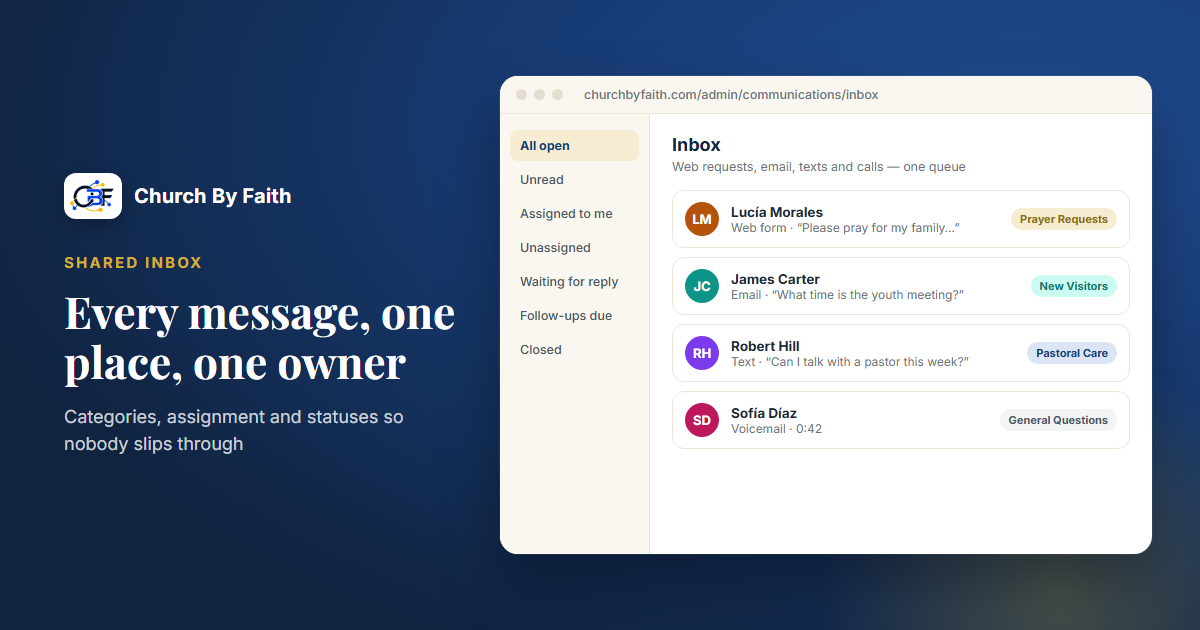
In many churches, messages arrive everywhere at once. A prayer request comes through the website, a visitor replies to an email, a member texts the pastor's cell, and a voicemail sits on the office line until Tuesday. Each message reached someone, but nobody can see the whole picture, and the quiet requests are the ones that get lost. A single shared inbox fixes that. Here is how to set one up so it actually works.
Why scattered messages hurt pastoral care
When messages live in personal phones and separate accounts, a few problems show up again and again:
- Nobody knows who answered. Two leaders reply to the same person, or both assume the other one did.
- Vacations become gaps. When the one person who holds the conversation is away, the conversation stops.
- There is no history. A new staff member has no idea that this family asked for prayer twice last year.
- Sensitive things travel too far. A private request forwarded around a group chat reaches people it was never meant for.
- Follow-up depends on memory. "I'll check back next week" works until the week gets busy.
A shared inbox doesn't replace pastoral judgment. It gives that judgment a place to work from.
Set up your inbox in five steps
1. Bring every source into one queue
List every way a message reaches your church: website prayer and contact forms, the church email address, replies to church emails, texts to the church number, and voicemail. Then route as many as you can into one place. Retire personal numbers and inboxes for church business wherever possible, and tell people the one address and number to use.
2. Sort by ministry, not by channel
A prayer request is a prayer request whether it came by email or text. Organize conversations by what they are about, so the right team sees them. Four categories cover most small and mid-size churches:
- Prayer requests
- Pastoral care
- New visitors
- General questions
Mark the sensitive categories, such as pastoral care, as restricted, so only the people responsible for that ministry can open them. The office volunteer who answers "What time is service?" doesn't need to read a marriage crisis.
3. Give every conversation an owner
A message that belongs to everyone belongs to no one. Assign each conversation to a person or a team, such as the prayer team, the welcome team or the pastors. Keep an "unassigned" view and make someone responsible for emptying it every day. In a small church that may simply be the administrator. In a larger one it may rotate.
4. Use statuses so nothing falls through
Statuses turn a pile of messages into a to-do list. The ones that matter most:
- Open: needs attention.
- Waiting for reply: you answered and are waiting on them.
- Snoozed: hidden until a date you chose, such as "check back after the surgery."
- Follow-up due: a reminder to reach out again has come due.
- Closed: done, with the history kept.
Closing a conversation isn't dismissing a person. It means this particular thread is finished, and the history stays with them.
5. Prepare templates and use internal notes
Write a small set of approved reply templates for the things you answer often: service times, how to join a group, a gentle first reply to a prayer request, a welcome to a new visitor. Templates keep answers accurate and consistent, especially for volunteers, and in a bilingual church they make sure both languages get an equally good reply. Always personalize before sending.
Use internal notes, which the person never sees, for context between staff: "Spoke with her after service Sunday, she'd prefer a call," or "Pastor Luis is handling this one."
A weekly rhythm for the inbox
An inbox only works if someone looks at it. A simple rhythm helps:
- Daily: clear the unassigned and new-request views. Acknowledge prayer requests the same day where you can, even if the fuller reply comes later.
- Twice a week: check follow-ups that are due and snoozed conversations that have come back.
- Weekly: in staff or care-team meeting, look at anything open for more than a week and decide who takes it.
- Monthly: review categories and templates. Are requests landing in the right place? Is a template out of date?
Here is how one message might move through that rhythm. On Monday morning a visitor replies to the welcome email: "Thanks. My husband is in the hospital, could someone pray with us?" The administrator sees it in new requests, moves it to Pastoral Care and assigns it to the pastor on call that week. The pastor calls that afternoon, adds an internal note ("Visited Tuesday, surgery Thursday"), and snoozes the conversation until Friday. On Friday it reappears, the pastor checks in, and the conversation closes with its whole history kept for the next time the family reaches out.
Also agree on a few ground rules, such as a target time for first replies, who covers when someone is away, and which conversations should move to a phone call or an in-person visit.
How Church By Faith's inbox works
Church By Faith's Communications area includes a shared inbox (Inbox) built around this approach.
- One queue. Prayer and care requests from the web, email replies, texts, calls and voicemail can land in the same inbox.
- Views for all open, unread, assigned to me, unassigned, waiting for reply, follow-ups due, snoozed, closed and new requests.
- Ministry categories for prayer requests, pastoral care, new visitors and general questions, and categories can be marked private or sensitive.
- Assignment, teams, priority, tags, snooze and language filters, so bilingual churches can see which conversations need a Spanish or English reply.
- Approved reply templates and internal notes that are never sent.
- Replies by email or text, which require the person's recorded consent for that channel.
- Optional AI drafts. If the church turns it on, "Suggest a draft" can help with a reply, a translation or a summary. AI text is never sent automatically. A person always reviews and sends it.
Some sources need setup first. Inbound email needs an inbound email domain. Texting needs the church's own texting account and carrier (A2P 10DLC) registration, which By Faith Apps confirms. Call routing is newer, so test it before you rely on it. Prayer and care requests submitted on the web don't need that extra setup. See the full list on the features page, or contact us for help with setup.
Quick checklist
- List every way messages reach your church today.
- Route them into one shared inbox, and retire personal numbers for church business.
- Create a few ministry categories and restrict the sensitive ones.
- Make sure every conversation has an owner.
- Use statuses, snooze and follow-ups instead of memory.
- Write approved templates in every language you serve.
- Clear the unassigned view every day.
See how the shared inbox, categories and reply templates work on the Church By Faith features page.