Church Management
Church App Security: Roles, Permissions, and Member Privacy
By Church By Faith Team · · 5 min read
Who in your church should see a member's phone number, a private prayer request or a giving record? A practical guide to roles, permissions and member privacy.
A church holds some of the most personal information anyone will ever share: a marriage in trouble, a diagnosis, a child's name, a monthly tithe. When that information moves into software, the question is no longer only "is it secure?" but "who in our church can see what?" This guide walks through roles, permissions and privacy choices that protect your people without slowing down ministry.
Why church data needs extra care
Most church data breaches are not dramatic hacks. They are ordinary mistakes: a volunteer with an admin login they no longer need, a spreadsheet of phone numbers emailed to the wrong list, a prayer request read by more people than the person expected.
Church information is sensitive in three different ways:
- Personal data: addresses, phone numbers, birthdays, children's names.
- Pastoral data: prayer requests, care conversations, family situations.
- Financial data: who gave, how much and how often.
Each kind deserves its own rules. The treasurer needs giving records but not prayer requests. A care pastor needs prayer requests but not giving totals. A small-group leader needs names and phone numbers for their group, not the whole church. Good security starts with admitting that "staff" is not one group.
Roles and permissions: least privilege, explained simply
A role is a bundle of permissions you give to a type of person. A permission is one specific ability, such as "view member phone numbers" or "export giving data."
The principle to follow is least privilege: give each person what they need for their ministry, and nothing more. In practice:
- List your real jobs, not your titles. Who approves new members? Who reads private prayer requests? Who handles money? Who moderates groups?
- Match each job to the narrowest role that covers it. Resist making everyone an administrator because it's easier.
- Keep the number of full administrators small. Two or three trusted people is often plenty for a small church.
- Separate money from ministry. The person who records gifts should not be the only person who can review them.
- Review access every quarter. When a volunteer steps down, remove their access the same week.
- Watch for self-promotion. A healthy system does not let someone grant themselves more access.
Protect the most private things first
Some information should be private even from church leadership. When you evaluate a church app, ask how it handles these:
Prayer requests
Members should choose who sees each request: the whole church, leaders only, or a private request for the pastoral team. Someone should also be able to share a request without their name, and "anonymous" should mean anonymous in the system, not just hidden on the screen.
Private messages and journals
If members can message each other, those conversations should be private to the people in them. A personal prayer journal should be readable only by the person who wrote it. Tell your congregation plainly what staff can and cannot see. Trust grows when there are no surprises.
Contact details and the directory
Many members are happy for their small group to have their phone number but not the whole congregation. A church directory should be opt-in, and each person should choose which details appear.
Giving records
Giving information should be visible only to those who handle it, and card details should never be stored in your church's system at all.
Sign-in and account safety
Even perfect permissions fail if an account is easy to take over. A few basics:
- Turn on two-step verification for everyone with administrator or pastoral access. An authenticator app on their phone is a good choice, and they should keep the recovery codes somewhere safe.
- Never share logins. Each person gets their own account so you can see who did what.
- Check sign-in activity if something looks wrong.
- Offer a clear way to leave. Members should be able to delete their account without calling the office.
Questions to ask any church software vendor
Before you trust a platform with your congregation, ask:
- How is our church's data kept separate from other churches' data?
- Can we limit who sees phone numbers, prayer requests and giving, separately?
- Can staff read members' private messages? (The honest answer should be clear either way.)
- Is there a record of who exported data or changed settings?
- Can we get our data out if we leave?
- Which security certifications do you hold, and which do you not? A trustworthy vendor answers this directly.
How Church By Faith handles this
Church By Faith gives each church its own space, isolated at the database level. If a page were ever missing a check, it would return nothing rather than another church's records.
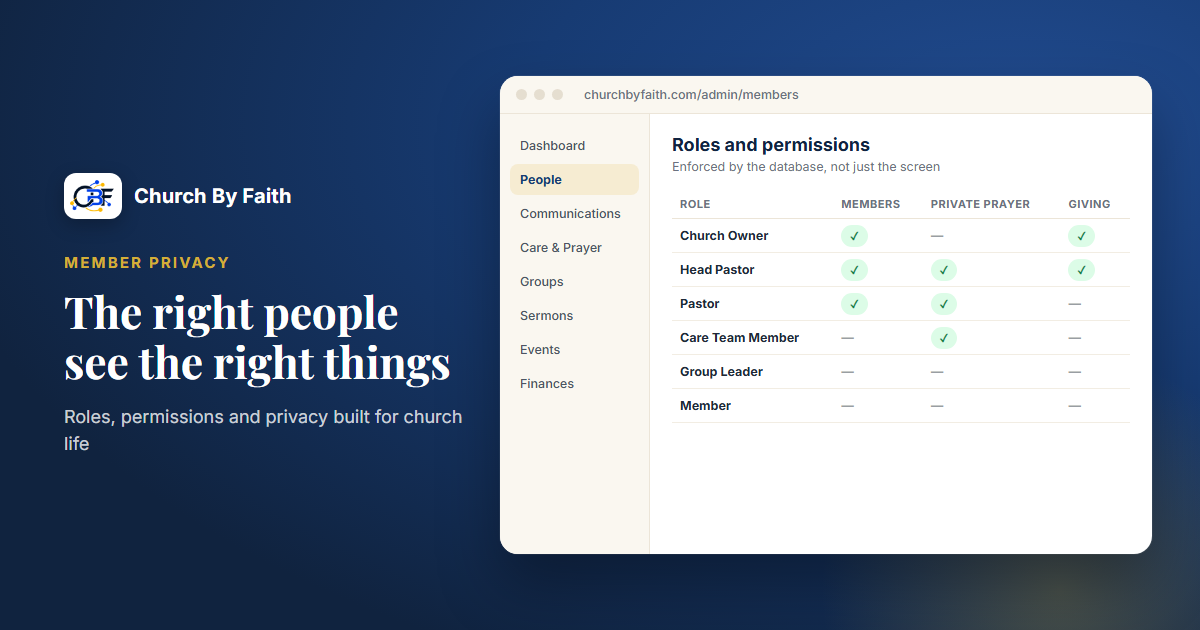
There are seven built-in roles: Church Owner, Head Pastor, Pastor, Care Team Member, Group Leader, Member and Guest. Behind them sit 81 named permissions, enforced by the database rather than just hidden in the interface. Delegation is guarded: nobody can change their own permissions or grant one they don't hold, and only an owner can change an owner. On Premium, you can grant advanced roles and permissions person by person. The number of admin users depends on the plan, as shown on the pricing page. Changes to exports, settings and deletions are recorded in an audit log.
Privacy is built into daily tools:
- Prayer requests offer "Everyone at church," "Leaders only" or "Private," plus "Share without my name," which the database enforces so not even leaders see who asked. Private requests go to the Head Pastor, Pastors and Care Team by default, not to the Church Owner.
- Direct messages between members are private. Admins see a message only if a participant reports it. Group chat is different by design, and group leaders and admins can read and moderate it, so tell your groups.
- The private prayer journal (Growth and up) is readable only by its author.
- Email and phone in the member list are visible only to staff with member-management permission. The directory is off until the church turns it on, and each member chooses what appears.
- Giving: card giving, which today runs only for our founding ministry, uses hosted checkout, so card data never touches the app; other churches record gifts sent by Zelle, check, cash or transfer.
Sign-in supports a password or an emailed code, optional two-step verification with an authenticator app and recovery codes, and a sign-in activity log. Members can delete their own account. Donation records are kept for seven years, unlinked from the person's account.
To be clear about what it is not: Church By Faith does not claim SOC 2 or HIPAA certification, and it does not offer single sign-on (SSO). If your church needs those, ask any vendor for proof in writing. If you have questions about a specific situation, talk with the team.
Quick checklist
- List real ministry jobs and map each to the narrowest role.
- Keep full administrators to a small, trusted group.
- Separate who handles money from who handles pastoral care.
- Let members choose who sees their prayer requests.
- Tell your congregation what staff can and cannot read.
- Require two-step verification for leaders.
- Review access every quarter and remove it promptly when someone steps down.
Learn how Church By Faith protects member information with roles, permissions and database-level isolation on the features page.