Pastoral Care
Prayer Request Forms: Privacy, Routing, and Follow-Up
By Church By Faith Team · · 5 min read
A prayer request form is an act of trust. How to ask the right questions, let people choose who sees their request, route it to the right people and follow up well.
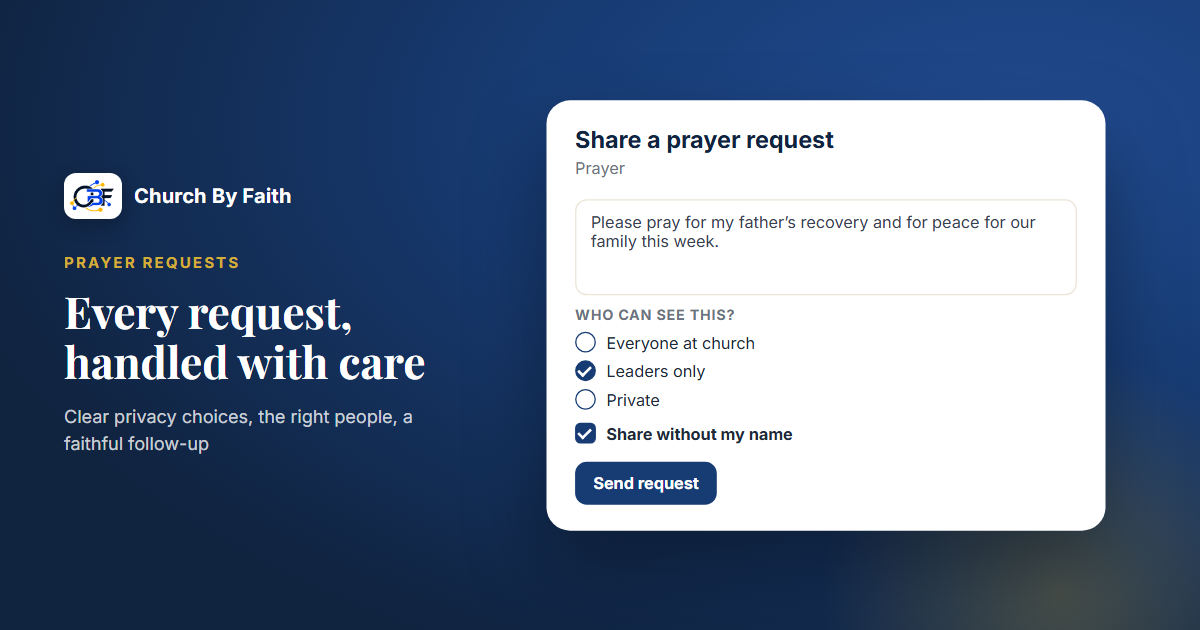
When someone fills in a prayer request, they are handing your church something tender: a diagnosis, a struggling marriage, a job loss, a child far from God. The form they use tells them, before anyone replies, whether that trust will be honored. A good prayer request form is clear about who will see the request, gets it to the right people, and leads to a real follow-up. Here is how to build one.
What a good prayer request form asks
Keep the form short. Every extra field is one more reason to close the page. The essentials:
- The request itself. A single open text box, with a gentle prompt such as "How can we pray for you?"
- Who can see it. A clear choice of visibility, explained in plain words (more on this below).
- Their name, or not. An option to share without a name.
- Whether they want contact. "Would you like someone from the church to reach out?" Yes or no.
- How to reach them, if yes. Their preferred channel, and separate permission for each one, such as email or text.
- Language. In a bilingual church, the language they'd like a reply in.
Avoid asking for things you don't need, such as address, date of birth or membership status. If the person is signed in, you already know who they are.
A short line at the top sets expectations: "Our prayer team prays over every request. If you ask us to, a pastor or care team member will contact you." If you can't promise a response time, don't imply one.
Privacy: let people choose who sees their request
People often hold back the real request because they don't know who will read it. Remove the guesswork by offering clear levels and saying exactly what each means.
- Everyone at church. Shared with the congregation's prayer list. Good for requests people are glad to have others pray over, such as surgery next week or safe travel.
- Leaders only. Seen by pastors and the care or prayer team, not the whole church.
- Private. Seen only by the pastors and care team members responsible for private care.
Then add share without my name. Some people want prayer but can't bear to be identified: an addiction, a secret burden, something involving another person. An anonymous option lets them ask anyway. If you offer it, make sure it is truly anonymous, and not just hidden from the public list while staff can still see the name.
A few more practices protect trust:
- Decide in writing who reads private requests, and keep the list short.
- Never forward requests outside the approved group, and never paste them into group chats.
- Ask before sharing a praise report. An answered prayer that was private stays private unless the person says otherwise.
- Don't repeat names from the pulpit without permission, even for requests shared with everyone.
Routing: getting each request to the right people
A form is only as good as what happens after someone presses submit. Decide in advance where each kind of request goes.
- General prayer requests go to the prayer team to pray over.
- Requests marked "please contact me" go to a specific person or team who replies.
- Pastoral care needs, such as grief, hospitalization or family crisis, go to a pastor or the care team.
- Requests from first-time visitors should also reach the welcome team, so the person gets a warm, personal follow-up and not just a form reply.
- Requests from your public website, from people who aren't members yet, need an owner too. They are often from people who have nowhere else to turn.
Picture a Sunday evening. A woman who visited once submits a request through the website: her son is struggling with addiction, she'd like prayer, and yes, she'd like someone to call. She chose "leaders only." On Monday the prayer team prays over it, a pastor calls her that afternoon, and the welcome team, who can see that she asked for contact but not what the request says, sends a short note inviting her back. Each person does one part, and nobody sees more than they need to.
Make someone responsible for checking new requests every day, and have a backup for when they're away. Agree on what to do when a request suggests someone is in danger: a pastor contacts them directly and, where appropriate, encourages them to reach local emergency services.
Follow-up: closing the loop
Follow-up is what turns a form into pastoral care.
- Acknowledge quickly. Even a short reply, such as "Thank you for sharing this. Our team is praying," tells the person their request didn't disappear.
- Pray, and say so. A specific message is better than a generic one: "I prayed for your interview this morning."
- Check back. For ongoing needs, set a reminder to ask again in a week or two, and assign it to a person.
- Use the channel they chose. If someone asked for email only, don't call.
- Mark answered prayers. When someone shares good news, record it, and with their permission, celebrate it.
- Know when to move to a conversation. Some requests need a call or a visit, not more messages.
How Church By Faith handles prayer requests
Prayer requests are part of Church By Faith from the Basic plan (at the time of writing), and they follow the principles above.
- Three visibility levels. When members share a request, they choose "Who can see this?": everyone at church, leaders only, or private.
- Share without my name. Anonymity is enforced by the database itself, so not even leaders can see who asked.
- A clear private list. By default, private requests are read by the Head Pastor, Pastors and Care Team Members. The Church Owner role does not see them by default.
- Answered prayers. Requests can be marked answered.
- A public prayer form lets people who aren't members submit from your church website. Those requests land in their own "From the website" queue. (The website is built by our team as a separate one-time service.)
- Routing and follow-up. On the Growth plan and up, advanced prayer routing and a pastoral care queue help send each request to the right people. In the shared inbox, prayer requests have their own category that can be marked private, with assignment, follow-up reminders and internal notes.
- Replies that respect consent. Staff can reply by email, or by text once the church's own texting number and carrier (A2P 10DLC) registration are in place, and only on channels the person agreed to.
Compare plans on the pricing page, or see the full list of care tools on the features page.
Quick checklist
- Keep the form to the request, visibility, name option, contact wish and language.
- Explain each visibility level in plain words.
- Offer a truly anonymous option.
- Put in writing who reads private requests.
- Route every kind of request to a named owner, including website requests.
- Acknowledge every request quickly, and set reminders for ongoing needs.
- Ask permission before sharing any praise report.
See how Church By Faith handles prayer requests, visibility choices and care routing on the features page.