Giving
How to Record Offline and Online Donations Clearly
By Church By Faith Team · · 5 min read
Cash in the plate, checks in envelopes, Zelle transfers and card gifts online. Here is a simple process to record them all clearly and count each one only once.
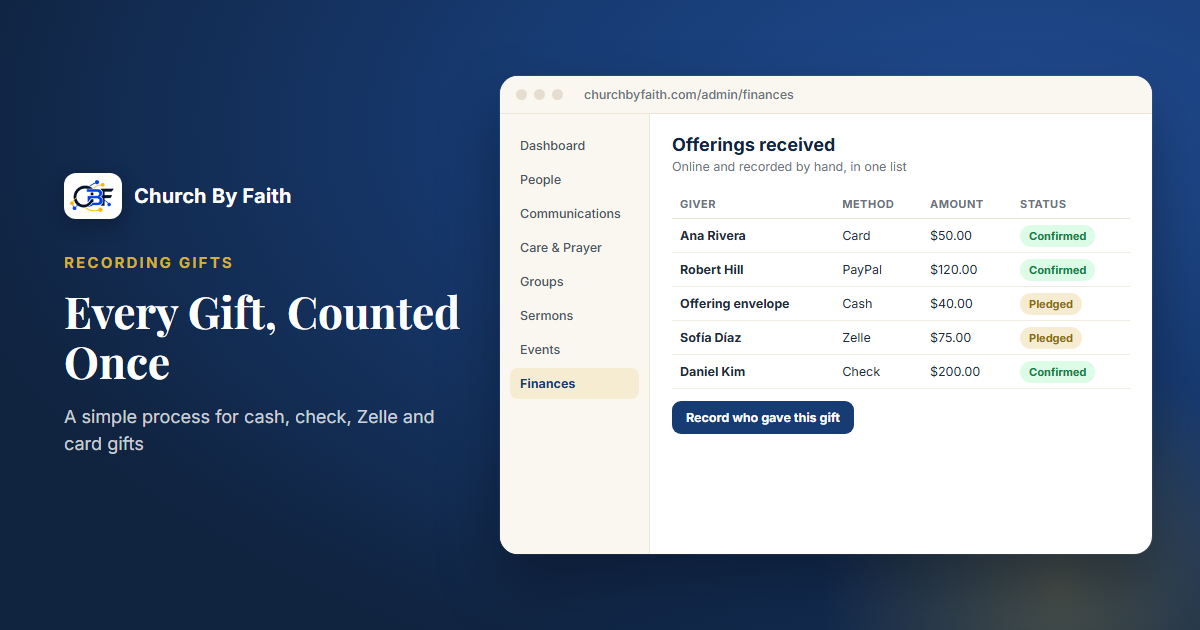
Most churches receive gifts in several ways at once: cash and checks in the offering, Zelle or bank transfers during the week, and card gifts online. When each type lives in a different notebook or spreadsheet, totals stop matching and year-end becomes stressful.
The fix isn't complicated. It is one place to record every gift, a few consistent habits and a regular check against the bank. This guide walks through that process step by step.
Set a few ground rules first
Before you change any tools, agree on these principles with your treasurer and counting team.
- One system of record. Every gift, however it arrived, ends up in the same place. Side notebooks can support it but not replace it.
- Every gift is recorded once. Decide which step creates the record so nobody enters the same gift twice.
- Every record has the same basic details: date received, amount, method (cash, check, Zelle, card, PayPal), donor or "anonymous," and a reference such as a check number.
- Nothing is deleted. Mistakes are corrected with a note, so the history stays clear.
- Two people handle cash. Counting and recording should never depend on a single person.
Write these rules down and keep them with the counting supplies. They protect the church and the volunteers who serve.
Recording cash and checks from the offering
Cash and checks need the most care because they pass through several hands.
On Sunday
- Keep the offering secure from collection to counting.
- Count with at least two people who are not related to each other, in a private room.
- Fill in a count sheet: loose cash, cash in named envelopes, and each check with its number, amount and giver.
- Both counters sign the count sheet.
- Prepare the deposit and record the total that goes to the bank.
Afterward
- Enter each named gift under the donor's name, with the method and check number.
- Enter loose cash as one anonymous amount.
- Keep the count sheets together with the deposit slip, so each record can be traced.
- Store check copies securely, or don't keep them at all. They contain bank account numbers.
A sample count-sheet line might read: "Check #2451, $50.00, M. Rivera, envelope marked 'tithe'." That is enough detail for anyone to trace it later.
Recording Zelle and bank transfers
Transfers arrive quietly during the week and are easy to miss.
- Assign one person to review the church's bank account for incoming transfers on a set day each week.
- Match each transfer to a donor using the name or memo. If the name is unclear, ask gently before guessing.
- Record the date the money arrived, not the date someone said they sent it.
- Ask regular givers to include a note such as "Offering, Sunday" so their gifts are easier to identify.
Some members will tell you they gave by Zelle before it shows up. You can note it as expected, but count it only when it appears in the bank.
Recording online card and PayPal gifts
Online gifts are recorded automatically by the giving platform, but they still need a little attention.
- Know what you are recording. A donor gives $100, the processor takes a fee, and a smaller amount reaches the bank. Decide with your accountant whether you record the full gift and the fee separately. Most donors expect their statement to show the full amount they gave.
- Note when donors cover the fee. If a donor chose to add the processing fee, the recorded gift and the amount they were charged will differ.
- Watch for failed and refunded payments, and make sure they don't stay in your totals.
- Match processor payouts to bank deposits. A single deposit often combines many gifts.
Reconcile every month
Reconciliation is simply confirming that your records and the bank agree. It is the step that makes every other step trustworthy.
- Total all gifts recorded for the month, by method.
- Compare cash and check totals with Sunday deposits.
- Compare Zelle and transfer records with the bank statement.
- Compare online gifts with the processor's payouts.
- Investigate any difference, write a short note and fix the records, never by deleting.
If you can't explain a difference, ask your accountant rather than forcing the numbers to match. Rules about what counts as a deductible contribution, and what statements donors need, are questions for your accountant, not for your software.
When a donor asks about their giving
Clear records pay off when a member asks, "Can you tell me what I gave this year?" or "Did my check arrive?"
- Look up their history in your system of record, not in a side notebook.
- Share only confirmed gifts, and explain any that are still pending.
- If they remember a gift you can't find, check the count sheets and bank records for that date before saying no.
- If you find a mistake, correct it with a note and tell them what changed.
- Share giving details only with the donor themselves, never with a spouse or family member unless the gift was given jointly.
A calm, accurate answer builds trust in how the church handles every gift.
How Church By Faith handles this
Church By Faith brings hand-recorded and online gifts together in one giving record. Giving records come with every plan, including Basic, once an admin switches the Giving feature on (see pricing). Online card and PayPal giving runs today only for our founding ministry.
- Hand-recorded gifts. Each member records the Zelle, cash, check or transfer gift they sent, from their own account. Each one lands as pledged, and the treasurer confirms it arrived. Gifts count in totals only after confirmation, which mirrors the "count it when it's in the bank" rule. Staff cannot enter a gift on someone else's behalf, so keep your signed count sheets and deposit records for offering-plate gifts that givers do not record themselves.
- Naming unnamed online gifts. "Record who gave this gift" lets the treasurer put a name on an unnamed card or PayPal gift, using the name the processor reports or the church's own records.
- Online gifts recorded automatically. Where card and PayPal giving is on, gifts through hosted checkout are recorded without anyone typing them in, including whether the donor chose to add the processing fee. Today that is only our founding ministry: card giving is not yet available to other churches, because per-church payment accounts are not built.
- Report and export. A giving report with per-donor pages, plus a CSV export for reconciliation and for preparing year-end statements with your accountant.
Zelle is recorded by hand, not connected to your bank. Church By Faith does not reconcile against your bank automatically, track designated funds, connect to accounting software or produce year-end statements for you. You can learn more on the features page.
Quick checklist
- Keep one system of record and enter each gift once.
- Record date, amount, method, donor and a reference for every gift.
- Count cash with two unrelated people and sign the count sheet.
- Review transfers weekly and count them when they reach the bank.
- Decide with your accountant how to record processing fees.
- Reconcile every month and correct mistakes with a note, never by deleting.
See how hand-recorded and online gifts come together on the Church By Faith features page.